четверг, 29 мая 2014 г.

OBIEE Overview


Oracle Business Intelligence Suite Enterprise Edition (OBIEE) is an enterprise Business Intelligence platform with the ability to source from multiple heterogeneous data sources to enable pervasive business analytics.  It consists of a broad set of capabilities including ad-hoc query and analysis, interactive dashboards, reporting, proactive intelligence and alerts, mobile analytics, and more.   The Oracle BI Server, the foundation of Oracle BI Suite EE, generates queries optimized for Teradata, appropriately aggregates data and presents the results to users within a familiar web browser via easy to use dashboards and reports.  While the Oracle BI Server also provides powerful analytic calculation functions it also understands when it should leverage the Teradata database for computation if it would yield better performance. 

Oracle has 4 suites of BI tools with similar and confusing names:

1)    OBIEE is often considered to be a single product; however, OBIEE is an integrated suite consisting of several interdependent components. OBIEE stands for Oracle Business Intelligence Suite Enterprise Edition – but the S for Suite is dropped. OBIEE is based on the acquired Siebel Analytics technology.

2)    OBIEE Plus is the same suite as OBIEE but it also includes the acquired Hyperion reporting tools (SQR and IR).

3)    Oracle Business Intelligence Standard Edition One is a suite that has nothing in common with Oracle Business Intelligence Standard Edition (description follows). Oracle Business Intelligence Standard Edition One is a suite designed for the small to medium sized business. It is based on the exact same technology platform as OBIEE.

4)    Oracle Business Intelligence Standard Edition (OBISE) is a suite with completely different components.

This document deals with the first 3 tools listed above.

Oracle Business Intelligence Applications (OBI Apps) is another Oracle product that includes OBIEE as part of the solution.  OBI Apps is an end-to-end solution that takes data from various source systems such as Siebel CRM, Oracle EBS, PeopleSoft, et al, loads it into Teradata and delivers Business Intelligence (BI) content to end-users.   OBI Apps includes pre-defined data integration mappings from the source system, an optimized physical star schema data model for Teradata, as well as pre-defined OBIEE reports and dashboards for end users.  OBI Applications is described in the “Teradata Corporation and Oracle Corporation Strategic Partnership Technical FAQ” available on TKO and the Oracle InfoHub.

Teradata integrates easily with the OBIEE architecture.  As a warehouse, Teradata provides the data and the power to support the business analytics.

Oracle Architecture

Not shown in the diagram below, Oracle BI EE Plus also bundles key Oracle Hyperion reporting products (SQR and IR) for integrated reporting with Oracle Hyperion financial applications.


Oracle Business Intelligence Enterprise Edition components:
·      Oracle BI Server – As the foundation of OBIEE Plus, the Oracle Business Intelligence Server generates queries optimized for each data source, appropriately aggregates them, and presents the results to end users.  A flexible, enterprise metadata layer spans all of the underlying data sources.   
·      Oracle BI Interactive Dashboards – Provides fully interactive collections of analytic content with a rich variety of visualizations.  Running on a Web-based architecture, the dashboards provide users with information filtered and personalized for their identity, function or role based on predefined security rules.
·      Oracle BI Answers – Self-service ad-hoc capabilities allowing end users to easily create charts, pivot tables, reports, and visually appealing dashboards, all of which are fully interactive with drill down capabilities.
·      Oracle BI Delivers – Near real-time, multi-step alert engine can trigger workflows based on business events and notify stakeholders via their preferred medium and channel (email, dashboards, and mobile devices).  This means field sales representatives can receive a short message service alert on their cell phone, warehouse managers get a PDF attachment via e-mail, and financial analysts obtain the report as an Excel spreadsheet saved to their shared corporate file system.
·      Oracle BI Disconnected Analytics – Full business intelligence functionality for the mobile professional, enabling fully interactive dashboards and ad hoc analysis while disconnected from the corporate network.  Intelligent synchronization of relevant data, analytic metadata, dashboards and saved selections occurs once a user reconnects to the enterprise network.
·      Oracle BI Publisher – Pixel-perfect reporting component allows the creation of highly formatted templates, reports, and documents such as checks, government form, and more.  It provides a central architecture for generating and delivering information to employees, customers and business partners – securely and in the right format.
·      Oracle BI for Microsoft Office – Allows users of Microsoft Excel and PowerPoint to access and run Oracle BI reports directly from within these familiar tools. Refreshable reports leverage native Microsoft Office functionality and the scalability and performance of the Oracle BI Server. Reports also reference a consistent and single source of truth as defined in the Oracle BI Server metadata - a critical requirement for pervasive use across the enterprise.
·      Hyperion Web Analysis – Delivers out-of-the-box OLAP analysis, presentation and reporting.  Hyperion Web Analysis take advantage of the many powerful and advanced analytics features provided in Oracle Essbase or other multidimensional sources. 
·      Hyperion Interactive Reporting – Pulls data from operational or analytic sources to create easily comprehensible charts, pivots, and reports. Hyperion Interactive Reporting adds the option of direct access to relational sources without the need to create and access a semantic layer via the Oracle Business Intelligence Server.
·      Hyperion SQR Production Reporting – Generates massive reports within specified time frames and connects to a wide variety of enterprise data sources.

OBIEE and Teradata Best Practices Part 1

Teradata Query Band Configuration

OBIEE can be set up for Teradata Query Banding.  To enable Query Banding, the appropriate SQL is added as a connection script that is executed before each query.  The connection script is found in the connection pool properties for the Teradata database.  

Tips/Traps:
·      The query banding must be set for the session. 
·      Different connection pools can have different Query Band settings.  This can be useful when setting different priorities with TASM.
·      OBIEE uses a setting in the connection pool to control the number of queries simultaneously executing on Teradata.  This setting can be bypassed if TASM and query banding are used.

Teradata Trusted Session Configuration

OBIEE can also be set up to use Trusted Sessions (TS).  The same technique that is used for Query Banding is used for Trusted Sessions.  SQL is sent to Teradata using a script that is executed before each query. 

Tips/Traps:
·      The Proxy user and proxy role used for Trusted Sessions is not built into OBIEE.  To get around this limitation a Table can be built that holds the proxy user and role.  OBIEE variables can then be used to pull the user and role based on the OBIEE login.

Write-Back Configuration

OBIEE has the capability to write data to the Teradata database.  This could be used by users who want to do planning or budgeting on a small scale. They could use OBIEE both as a reporting tool and also for entering sales quotas or projections etc.  In Answers, write-back is configured on a report by report basis.  The columns that are available for write-back appear in a box format for the end user. 

Tips/Traps:
·      Each connection pool name must be unique in the entire .rpd file.
·      Make the table that write-back is enabled for “not cacheable”.  This is an attribute on the physical property box for the table under the “general” tab.  

SQL Extensions – Evaluate Function

To enable access to database functions that OBIEE does not currently support there are 3 APIs available.  These APIs allow features and functions to be imbedded into logical SQL and passed through to the Teradata database just as if they were built-in. 

ODBC Settings

OBIEE uses ODBC to connect to the Teradata database.  Teradata ODBC needs to be installed on the same platform as your OBIEE server.  There is one setting to change when configuring the Teradata ODBC driver.  This is the Response buffer size.  Setting this to the maximum number will help with the retrieval of large data sets.  The maximum allowed is 1,048,576.

Parameters for the OBIEE server should be in sync with the settings on Teradata

Keeping the parameters in the NQSConfig.ini file in sync with the settings on Teradata will maximize performance.
      NULL_VALUES_SORT_FIRST specifies if NULL values sort before other values (ON) or after (OFF).  For Teradata, NULL_VALUES_SORT_FIRST should be set to ON.
      LOCALE specifies the locale in which data is returned from the server. This parameter also determines the localized names of days and months.   
      SORT_ORDER_LOCALE is used to help determine whether a sort can be done by the database or whether the sort must be done by the Oracle Business Intelligence Server.   As long as the locale of the database and OBI server match, OBI will have the database do the sorting.  If they do not match, OBI will do the sorting on the server. 

Tuning Teradata for OBIEE

Tuning Basics: 
      Primary Index (PI) - Use the join access paths to the tables if possible
      Secondary Indexes (SI) – Use on filter columns
      Statistics collected and kept up-to-date for PI, SI, join, filter columns and indexes
Advanced Techniques:
      Semantic layer views
>     Avoid outer joins
>     Avoid functions in join columns
>     Avoid mismatch of data type in join columns
      Use Partitioned Primary Indexes (PPI)

      Use Aggregate Join Indexes (AJI)

MicroStrategy Technology Philosophy

MicroStrategy Technology Philosophy: Leverage the Power of the RDBMS

The MicroStrategy architecture has its roots in the principles of Relational OLAP (ROLAP). A ROLAP architecture provides OLAP functionality to the end user (e.g. multidimensional framework, slice-and-dice interaction, drilling, etc.), but uses a relational database to resolve queries and perform calculations, rather then using a specialized proprietary multidimensional database.
MicroStrategy applications have been able to achieve industry-leading data scale because of the reliance on the processing power and data management capabilities of the underlying RDBMS.

Model-based Dynamic SQL Generation

Within the MicroStrategy Intelligence Server lies the MicroStrategy SQL Engine, which is responsible for generating SQL for all requests to the data warehouse. Hence, to the RDBMS, a MicroStrategy application is an SQL-based application, in many ways like any other SQL application accessing Teradata.

Schema Abstraction

The SQL Engine performs its work based on a metadata model defined to the system. Note that the MicroStrategy metadata is not used to store joins or schema-type information, such as star or snowflake. Instead, the metadata model stores content information for each table indicating that it contains a set of particular facts and a set of particular attributes. When a report request is submitted, the Engine breaks the report down into the individual components (i.e. attributes and facts), then begins searching the model to determine which combination of tables will be necessary and efficient in resolving the request.
Schema abstraction of the database columns (into MicroStrategy attributes and facts) provides the flexibility necessary to allow applications to be created quickly without having to change the structure of the data model. MicroStrategy is able to support virtually any type of star, snowflake, or hybrid physical design, including transactional schemas. The business model defined in MicroStrategy is easily able to span multiple stars/snowflakes in a single application and even a single query. MicroStrategy supports dimensional models well, but does not require a dimensional model.

Aggregate Awareness

Query performance in many data warehouses is enhanced through the use of aggregate tables. Aggregate tables, which are also called summary tables, store pre-computed results of data allowing users to query from a summarized set of data rather than the detail level data that would be stored in the fact table. In many cases, use of aggregate tables will improve query performance by orders of magnitude.
MicroStrategy provides an aggregate-aware Engine. MicroStrategy has allowed transparent navigation of aggregate tables, directing queries to summary tables when they exist without the user having to specify to use the table. The MicroStrategy SQL engine determines use of aggregate tables transparently at query time.

Multi-pass SQL

One of the key elements to providing analytical sophistication in business intelligence applications is MicroStrategy’s ability to generate multi-pass SQL. Multi-pass SQL is required to answer analytical questions that cannot be answered with a single SQL query block. Examples of questions / scenarios that require multi-pass SQL include:
  • Set qualification: “Show me sales by region over the last six months, but only for customers who purchased one of the 5 most popular products.”
  • Split metrics: query returns sales data from a sales star schema and inventory data from an inventory star schema
  • Metrics calculated at different levels of aggregation
  • Metrics calculated with different filtering criteria
  • Simulating outer joins on RDBMS platforms that do not support them natively
  • Querying multiple tables due to application-level partitioning
    Support for these scenarios, especially when combined together, provide a framework for significant analytic questions and value to the users of the system. One of the main optimizations the MicroStrategy SQL Engine makes is to generate SQL that performs these multi-pass queries as efficiently as possible.


Microstrategy Retailer Case

пятница, 17 января 2014 г.

SAP BO DI Installation

If you decide to install SAP BusinessObjects Data Services, you can choose Linux or Windows version. I show how to perform installation and setup of DI.

Firstly, some words about DI, from WIKI


Business Objects's Data Integrator is a data integration and ETL tool that was previously known as ActaWorks. Newer versions of the software include data quality features and are named SAP BODS (BusinessObjects Data Services). The Data Integrator product consists primarily of a Data Integrator Job Server and the Data Integrator Designer. It is commonly used for building data martsODS systems anddata warehouses, etc.
Additional transformations can be performed by using the DI scripting language to use any of the already-provided data-handling functions to define inline complex transforms or building custom functions.
Data Integrator Designer stores the created jobs and projects in a Repository. However, Data Integrator Designer also facilitates team-based ETL development by including a Central Repository version control system. Although this version control system is not as robust as standalone VCSs, it does provide the basic check-in/check-out, get latest, version labeling and undo checkout functionality.
The DI Job Server executes, monitors and schedules jobs that have been created by using the Designer.


Visit service.sap.com and download distributives of SAP BO DI. But before installation, you should have SAP BO platform, because DI will connect to SAP BO. Moreover, we should download temporary keys from service.sap.com.

Installation master asks us some information:

  • license key
  • SAP BusinessObjects credentials
  • DI repository creation (miss this point, will create later)
  • DI JobServer creation (miss this point, will create later)

After successful installation we can add DI Repository and JobServer.


The repository is a database that stores Designer predefined system objects and user-defined objects including source and target metadata and transformation rules. In addition to the local repository used by the Designer and Job Server, you can optionally establish a central repository for object sharing and version control.
The Designer handles all repository transactions. Direct manipulation of the repository is unnecessary except for

  • Security administration Data Services uses your security at the network and RDBMS levels.


  • Backup and recovery You can export your repository to a file. Additionally, you should regularly back up the database where the repository is stored.


The Job Server is an application that launches the Data Services processing engine and serves as an interface to the engine and other components in the Data Services suite.


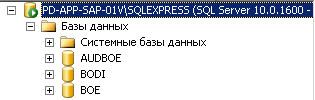
Lets's create DI repository. We need new empty database. I use MS SQL Server for this task.

Connect to SQL Server as "sa" (super administrator)


Than Add new database ->BODI


Than I can create local repository using SAP Data Services Repository Manager.


Input all credentials and "Create".
I will get message "The local repository was successfully created"


Than we can bind BO and DI by repository, we need to go in CMC and we find new label "Data Services"


Again we have to enter our credentials:


But here is one trick with port, be aware with port, in my case - 1433, i specially add it in MS SQL Server Control Manager in TCP/IP tab:


Last one, creating of Job Server in SAP Data Services Server Manager->Job Server->Configuration Editor
Again input our credentials of our repository

That's all. Now we can start Data Services Designer.


The Designer allows you to create, test, and execute jobs that populate a data warehouse. It is a development tool with a unique graphical user interface. It enables developers to create objects, then drag, drop, and configure them by selecting icons in a source-to-target flow diagram. It allows you to define data mappings, transformations, and control logic. Use the Designer to create applications specifying work flows (job execution definitions) and data flows (data transformation definitions).


четверг, 9 января 2014 г.

SAP BO 4 Performance issue

I got real problems with performance in BI Launch PAD. For instance, my reports were opening very long time, navigation in BI Launch Pad was awful. Business Users begat to claim.

At the end I fixed this problem. And I got very useful and helpful recipe for this problem.
Let's start.

1. Of course, we should start from updating SAP BO. Last available version is SAP BO SP2. Just took last one.

2.  Let's modify the Tomcat setting, because by default they have low value.
o   JavaHeapSize (-Xmx) from 2G to 4G 
o   MaxThreads from default (200) to 900 
2.1 JavaHeapSize we should modify:   
cd <bo inst folder>/sap_bobj/tomcat/bin 
nano setenv.sh


# set the JAVA_OPTS for tomcat
JAVA_OPTS="-d64 -Dbobj.enterprise.home=${BOBJEDIR}enterprise_xi40 -Djava.awt.headless=true -Djava.net.preferIPv4Stack=false -Xmx4g -XX:MaxPermSize=384m -XX:+HeapDumpOnOutOfMemoryError -Xloggc:/data/bo4dev/sap_bobj/tomcat/logs/tomcat.gc.log -XX:+PrintGCDetails -XX:+UseParallelOldGC"

2.2 MaxThreads we would modify:
cd /data/bo4dev/sap_bobj/tomcat/conf
nano server.xml


Define a non-SSL HTTP/1.1 Connector on port 9090
    -->
<Connector port="9090" protocol="HTTP/1.1" connectionTimeout="20000" redirectPort="8443" maxThreads="900" URIEncoding="UTF-8"/>
<!-- A "Connector" using the shared thread pool-->
<!--
    <Connector executor="tomcatThreadPool"
               port="9090" protocol="HTTP/1.1"
               connectionTimeout="20000"
               redirectPort="8443" />
    -->


3. Cleaning of old installed patches and service packs from BO. What does it mean?
Just go to <bo inst folder> and run ./modifyOrRemoveProducts.sh (for Linux):

It is clear that i have many various installation on my server. But it is important to delete old installation!
Now you see, that i deleted old one:


4. Cleaning of logging directory, in  <bo inst folder>/sap_bobj/logging
o   Deleting Trace-Files
o   Deleting Logs old than 30 days
5. Tuning APS, for start we can use CMC Wizard. 
6. APS properties for tracing set to unspecified (-> means bo_trace.ini are used)
Level
Description
Unspecified
Force the use of BO_trace.ini to be used
None
Only critical events such as failures will be logged
Low
Ignores warning and status messages
Medium
Only Status messages with least important will be ignored
High
Includes all the logging messages
7. Correction of blocking auditing activities, delete auditing events old 30 days:
In CMC go to Auditing and change parameter "Delete Events Older Than (Days)" on 30 from 365


8. Disabling of unused services in the CMC, for instance, Crystal, Analyses services.
9. Reorganisation of BO-Repository and BO-Auditing in DB2  (runstats) (Script is available in the filesystem). This one is high important point. As you know, every database has to manage its statistics according to number of rows. And if you do not collect stat, than you performance as well as refresh rate are decreasing. I used DB2 db, because it was by default with distrib for Linux.

Now we have to collect stat on all DB2 tables in our BO repository as well as AUDIT repository. 

Go to DB2 folder, you can find it in home folder of BO linux user:
cd <user's home folder>/sqllib/bin
There are two files:

runstats_audit.out
runstats_repo.out

They are responsible for collecting of DB2 statistics.
Just perform these scripts:
#db2 -tvf runstats_audit.out
#db2 -tvf runstats_repo.out

You have to schedule this task, and perform these scripts once per week.
You can do it via CMC:
CMC->Applications->Right Button on CMC and choose Program Objects Rights.


Mark "Run Scripts/binaries" and enter credentials for OS.
Or you can schedule it via your OS. For instance use crontab in Linux:


0 23  * * 7 /opt/bo4dev/sqllib/bin/runstats.sh >/dev/null 2&>1


For instance Shell Script for Linux:

db2 connect to boe14
db2 -tvf runstats_repo.out
db2 connect to audboe14
db2 -tvf runstats_audit.out


Than schedule this sh by cron.

In summary, performance of BO was increased dramatically.